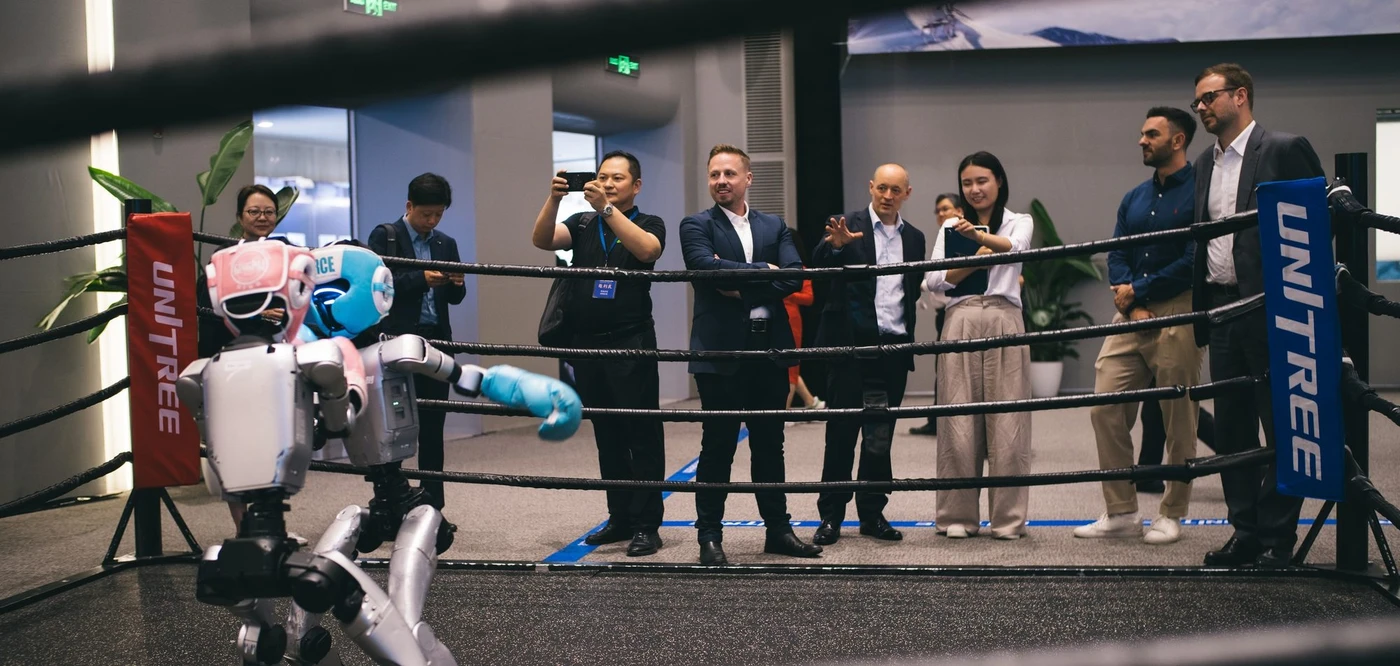
Unitree robots work by combining electric joints, sensor feedback and software that controls movement. A humanoid also needs a system that decides what task to perform and how to respond to its surroundings. For buyers, the useful question is which parts of that complete system are included in the specific robot they are evaluating.
Walking through malls, hotels and hospitals in China, I regularly pass cleaning and delivery robots that barely attract a glance. In an August LinkedIn post, I described that everyday scene alongside the enormous attention humanoids receive. I'm Thomas Derksen, co-founder of Asiabits. That contrast shapes how I look at a robot demonstration: what work can the machine repeat once the audience has gone?
Unitree, the Chinese maker of legged robots, offers a useful way to understand the question. Its public hardware specifications and developer tools let us separate physical movement from the application built on top. This guide uses the G1 humanoid as the main example. Specifications and development access need to be checked for each model and configuration.
What makes a Unitree robot move?
Powered joints create movement, and control software coordinates them into a posture or action. Think of the body as a set of connected mechanisms: moving a leg changes the position and load of the rest of the machine. The controller has to account for those relationships whenever the robot takes a step or reaches forward.
The manufacturer's G1 specification lists 23 degrees of freedom for the standard model, with additional options for the EDU version. A degree of freedom is an independently movable axis. The table also lists joint encoders, a depth camera and 3D LiDAR. Encoders measure joint position; the camera and LiDAR provide information about the surroundings.
Those components answer different questions. Joint feedback helps describe the body's configuration. Environmental sensing can help an application locate objects or obstacles. Software must connect the relevant measurements to the action being attempted. Having a sensor fitted is only the starting point for evaluating the behavior that uses it.
For a buyer, a good demonstration therefore includes a simple explanation of the information flow. Ask which sensors are active during the task, what the robot measures, and which program turns that information into movement. This gives an engineering team something specific to discuss with the supplier. It also makes two demonstrations easier to compare when their bodies look similar but their software differs.
How does the robot learn to walk and balance?
Unitree provides a reinforcement learning development workflow that trains movement in simulation and then transfers the resulting controller to physical hardware. Reinforcement learning means learning a behavior by optimizing a defined reward through repeated interaction. Here, the learned controller is usually called a policy: software that maps observations to actions.
The company's RL Gym repository documents a sequence of training, checking the policy, testing it in a second simulator and deploying it to a real robot. It supports several Unitree platforms, including G1. The second simulation stage is intended to check that the learned behavior has not become too dependent on one simulator's characteristics.
That workflow explains how an engineering team can develop motion. A business evaluating a supplier should ask which behavior was trained, under which conditions it was tested and which software version is running on the demonstration unit. Request an explanation that connects the training objective to the movement you see. A polished video alone leaves that connection unanswered.
It is also useful to separate development from everyday operation. An operator selecting an existing behavior and a researcher training a new one are doing different jobs. Establish which role your team expects to take. If the project includes changing the motion itself, assign someone to own the training and validation work before choosing the hardware.
Who decides what the robot does next?
The next action can be selected by a person, a prepared program or an autonomous application, depending on the system being demonstrated. Each arrangement can be useful. What matters for a purchase is knowing which one produced the result and whether it fits the intended job.
Consider a proposed task in which a robot carries a container from a workstation to a collection point. A person might choose the destination remotely. A prepared workflow might select a fixed destination after receiving a signal. A more autonomous application might identify the container, determine its destination and handle changes along the route. Treat these as separate proposals with different development and operating requirements.
A walking controller addresses the physical movement needed along the way. The application still needs to define when the job starts, how success is recognized and what happens if the container is missing. Those decisions connect the robot to the business process. They deserve as much attention in a supplier conversation as the quality of the walking demonstration.
Ask the operator to describe one complete attempt from start to finish, including every human intervention. For a fuller discussion of selecting behaviors through software, see our guide to what Unitree robot apps can do. The useful distinction is between choosing an available motion and delivering the complete job your operation requires.
What does a developer need beyond the robot body?
A developer needs access to the appropriate interfaces, a compatible hardware configuration and a clearly defined application. Unitree publishes SDK2, a software development kit with examples for working with its robots. An SDK supplies tools for writing software; the buyer still needs to identify who will build and maintain the application.
The G1 product table explicitly distinguishes secondary development availability between the standard and EDU configurations. Before placing an order, have the supplier confirm the exact development access, computing hardware and hand configuration included. Put the intended task beside that configuration when reviewing the proposal. This prevents a technically impressive platform from arriving without an interface the project depends on.
Our own company mapping helps explain why the supplier discussion extends beyond the complete robot. In our database of 7,000+ robotics companies, the November 14 snapshot contains 7,320 records worldwide, including 1,597 classified as Components and 214 as Humanoid Robots. These are counts of our records across countries. They show the breadth of the supplier search available through Asiabits.
A project may need expertise in hands, sensing or application software as well as the body. Start with the missing capability, then identify the company responsible for supplying it. Our explanation of robot actuators and joint suppliers covers the hardware beneath the movement. For an application team, the next practical step is a written map of what comes from the manufacturer and what the integrator must provide.
How should a company test a Unitree robot before buying?
Test one defined task under conditions that resemble the intended workplace, with a clear record of completion and human assistance. Begin by writing down the starting state and the required finished state. For the container example, specify where the container begins, where it belongs and how the system confirms delivery.
Then agree which variations the test should include. A different container position, a person crossing the route or an unavailable collection point may matter to your operation. Select variations because they occur in the actual process. Ask the supplier to explain what the robot is expected to do in each case before starting the trial, so the outcome can be assessed against a shared expectation.
Keep the evidence simple enough for the people making the decision. Record completed attempts, interrupted attempts, operator interventions and the time needed to restore operation. Separate the time spent doing the task from setup and recovery. If a person has to help, record the action they take and the skill it requires. That information helps establish staffing and support needs.
Ask for a second demonstration after the setup has changed within the agreed test conditions. This shows your team how the supplier adjusts the system and whether the process is documented. For planning the visit itself, our guide to evaluating a robotics factory visit explains how to turn access into usable evidence.
Include the people who would run the system in that trial. Ask an operator to follow the proposed instructions, observe where they need help and note which questions remain unanswered. The engineering team can then distinguish a missing instruction from a missing capability. Have the supplier identify who would investigate a failed attempt and what information they would need. A clear handover gives the buying team a practical basis for discussing training, spare parts and technical support alongside the robot itself.
Bring the results back to the original business question. If the purpose is research, the decision may turn on development access and the ability to modify behavior. If the purpose is a production task, the decision depends on repeatable completion, integration and support. Choosing the purpose first makes it easier to recognize which demonstration provides the evidence you need.
Asiabits helps companies explore Chinese robotics suppliers through company research and bespoke visits to robotics companies. A useful starting brief names the task, the present workflow and the technical questions your team wants to answer. That gives us a basis for selecting relevant companies and preparing discussions around the capabilities you need to evaluate.
Frequently asked questions
How do Unitree robots keep their balance?
Motion control software coordinates powered joints using feedback about the robot's state. Unitree also publishes a reinforcement learning workflow for developing motion policies in simulation and transferring them to physical robots.
Are Unitree robots fully autonomous?
Autonomy depends on the particular behavior and application. Ask whether a person, a prepared workflow or an autonomous system selects the actions during the demonstration, and record any human assistance.
Can developers program a Unitree G1?
Unitree lists secondary development for the G1 EDU configuration and publishes developer tools. Confirm the exact model, interfaces and computing options included in a proposed purchase.
What should a business test before buying a Unitree robot?
Define a complete task and test it under representative conditions. Record completion, human intervention and recovery effort so your team can assess the application and its support requirements.
Get These Insights Every Monday
Join 18,000+ professionals reading Asiabits. Free, every Monday, straight from Shanghai.
Subscribe Free →